Verse
Local-first notes with AI you can supervise

Your AI's Favourite Notetaking App

Plain files on your own device, a real editor for you, and a safe lane for every AI. See each change, keep what you like, undo the rest. Send any page to any AI with one button.

Request access by email

Early access goes out in small groups. Email adrian@montoya.world for a spot.

Projects › Week of 5 OctNew
Week of 5 OctClaude is editing
Add iconFavourited

Week of 5 Oct

The phone learns to type this week. Everything else waits until the editor feels as good on glass as it does on the Mac.

This week

Settle the brand
Record the demo for the waitlist
Ship the iOS editor beta
Call the printer
Draft the waitlist email, short, one link
Claude added 1 block RejectKeep
Made for AI to write inEvery page is a plain file with a published spec. No API to learn, no export step. If an AI can read and write a file, it can work in Verse.
Made for people tooA real block editor on top of the same files: slash commands, toggles, databases and a grid you arrange by dragging.
Works beside what you useVerse is not here to replace your other tools. Keep Notion, Obsidian or anything else, and let Verse be the place your AIs write to.
A new way to take notes with AI

AI does the work. You stay in charge.

Most tools make you choose: keep AI out of your notes, or let it loose and hope. Verse is built around a loop in between, so AI can do real work in your notes and you never lose track of what it touched.

SendOne button, or one shortcut, hands any page to any AI as clean context.
DraftThe AI writes in its own lane. Every block it adds or changes is marked with its name.
ReviewSee the changes as a diff on the page. Accept, reject or edit each one.
Keep or rewindEverything is checkpointed first, so any AI session undoes in one click.
Send to AI Planned

One button. Any AI.

Press one button, or one keyboard shortcut, and the page you are on is packaged as clean context and on its way to Claude, ChatGPT, Gemini or whatever you use. No copy and paste, no export, no reformatting.

Concept
Projects/Launch planSend to AI ⌘⇧A

Launch plan

What has to be true before the waitlist opens.

Before launch

Brand book, first edition
Landing page
Record the demo
What to send
This page
Page and subpages6 pages
Selected blocks
Where to
Claudeopen with context
ChatGPT
Claude Codefile path
Copy as Markdown
1,240 tokens · private blocks left out
Send
One shortcutPlanned
Same action from the keyboard, from the menu bar, from Spotlight and from a widget. It sends what you are looking at, or what you have selected.
Context an AI can usePlanned
Clean Markdown with the page's properties, its path and its links, plus the pages it points to if you want them. You see the token count before it goes.
Private stays privatePlanned
Blocks and pages you mark private are left out of every send. The list of what was included is shown, so nothing leaves by surprise.
Works withClaudeChatGPTGeminiClaude CodeCursorAny app that takes Markdown
Supervision Planned

AI that cannot quietly ruin your notes.

The fear with AI in your notes is the silent rewrite you find three weeks later. Verse treats AI as an editor you supervise: it is named, it is checkpointed, it is reviewable, and it can be fenced off. Supervising it is meant to take seconds, not attention.

Concept
Projects/Launch planClaude · 3 changes

Launch plan

Claude edited this page · 2:14 pmReject allAccept all
Landing page
Claude · changed Reject · AcceptLanding page: swap the mockups for real screenshots
Claude · added Reject · AcceptWrite the privacy line for the waitlist form
Brand book, first edition
History
Claude, 3 changes2:14 pm · waiting for review
You2:02 pm · typed
Claude, 1 changeYesterday · accepted
CheckpointBefore Claude started
Restore this version
Every AI edit is signedPlanned
Each block remembers who wrote it, you or which AI, and when. Filter a whole workspace down to what an AI has touched.
Review without frictionPlanned
Changes appear as an inline diff on the page you are already reading. Accept, reject or edit one block, or accept the lot with one key.
Checkpoint before every sessionPlanned
Verse snapshots the page, or the folder, before an AI starts. Undo a whole session in one click, including a deletion.
FencesPlanned
Mark a page or folder read only, append only or off limits. A journal can be readable but never editable. An Inbox can be the only place an AI may add.
An activity log you can readPlanned
A plain Markdown file lists every change by every AI, so you can audit it in Verse, in git or in any editor.
Stops itselfPlanned
Limits on how many pages an AI may change in one session. A big or destructive change is held for your approval, not applied.

Choose how much trust each AI gets

Set it per AI and per folder. Turn it up as an AI earns it.

Read onlyIt can read what you send or allow. It cannot change anything.
SuggestIt proposes edits. Nothing is written until you accept.
Edit with reviewIt writes to the page, marked, and you review the diff. The default.
Edit freelyFor a scratch folder, with a checkpoint behind it.

Why this works in Verse

Because your notes are plain files, a checkpoint is a copy of files and an activity log is a file. Nothing in this lane depends on a server, so it works fully offline and on a folder that never leaves your Mac.

It also means supervision does not depend on the AI behaving. Verse enforces the fence and records the change itself, whichever AI is on the other end.

Private by default

Notes that never leave your device.

Verse has no cloud to trust. It opens a folder on your own machine. No account, no server, no analytics on your writing. If you never connect an AI and never turn on sync, nothing you write goes anywhere.

Local onlyToday
The folder lives on your device. The Mac app works fully offline, with no sign-in.
Sync you controlToday
Sync is a folder in your own iCloud Drive, or nothing at all. Verse runs no sync engine of its own.
Self-hostablePlanned
Put the folder on your own server, NAS or git remote and keep it in sync with the tools you already trust. The AI connection is a small service you run yourself.
AI is off until you turn it onPlanned
Nothing is shared with any AI by default. You choose which AI, which folders and what it may do.
Use a model on your own MacPlanned
Point Verse at a local model and the AI works on your notes without a byte leaving the machine.
Safe to leaveToday
Your notes are open Markdown with a published spec. Stop using Verse tomorrow and you still have every page.
The editor

A real editor for the human half.

Pages are made of blocks you can turn into anything and place on a magnetic grid. Drag a block and the rest of the page makes room. No widths to fiddle with, no layout that breaks.
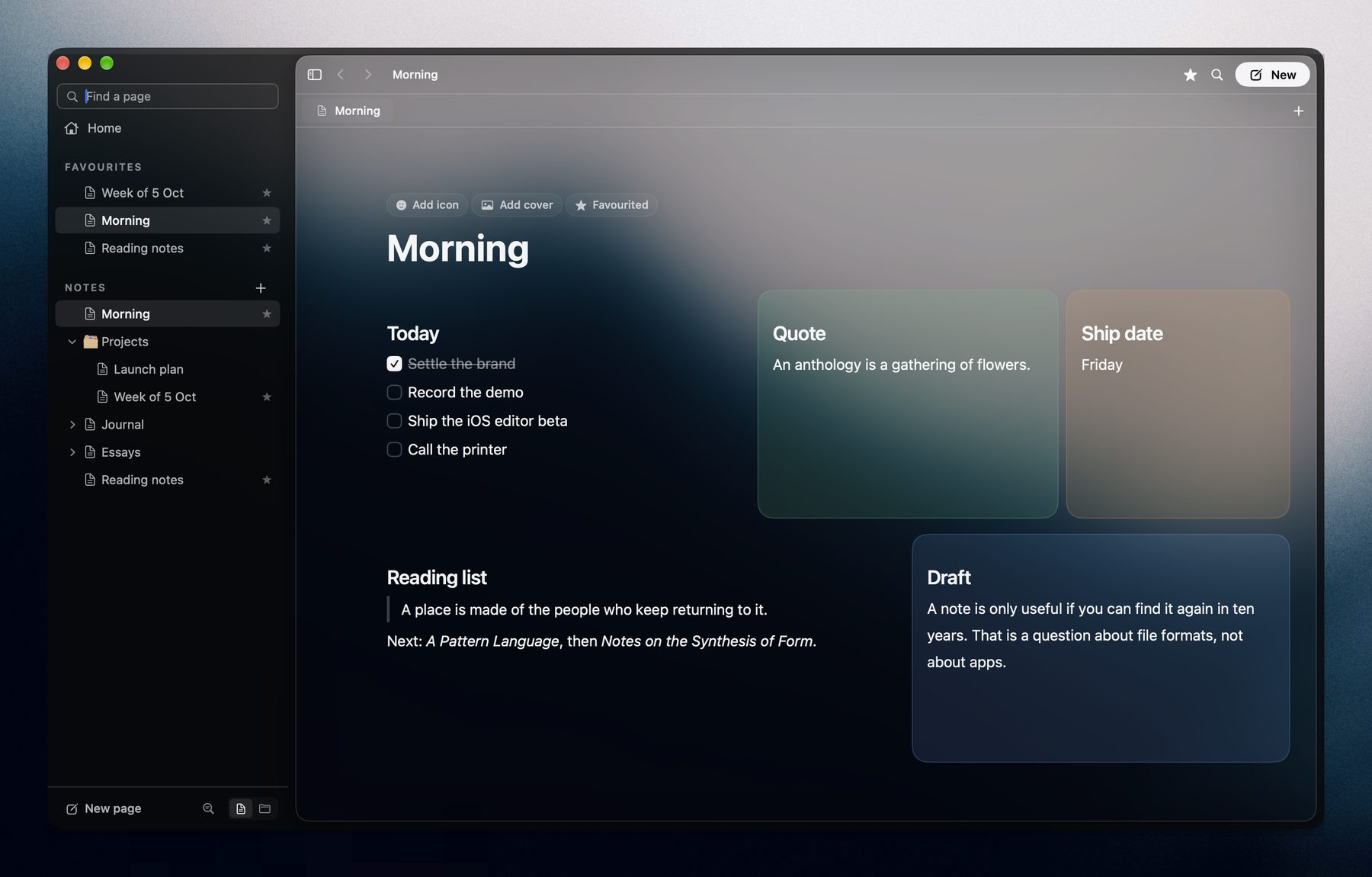
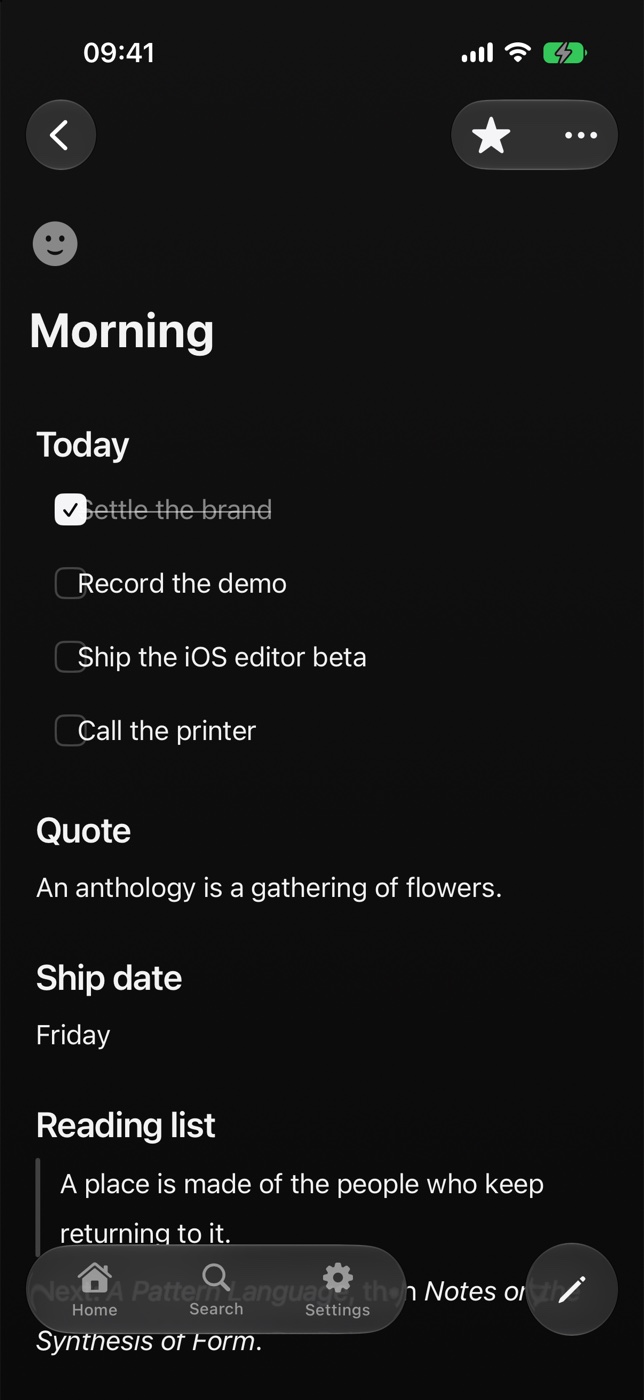
A Verse page called Morning laid out as a grid: a to-do list, a quote, a ship date, a reading list and a draft, each in its own tinted box.

A real Verse page. The layout is saved in the Markdown file, and on a phone the same blocks read top to bottom.

Files

The page is the file.

Every Verse page is a Markdown file in a folder you choose. What you see on the left is exactly what is on disk on the right. Open it in Finder, in another editor, in ten years. Nothing is locked in.
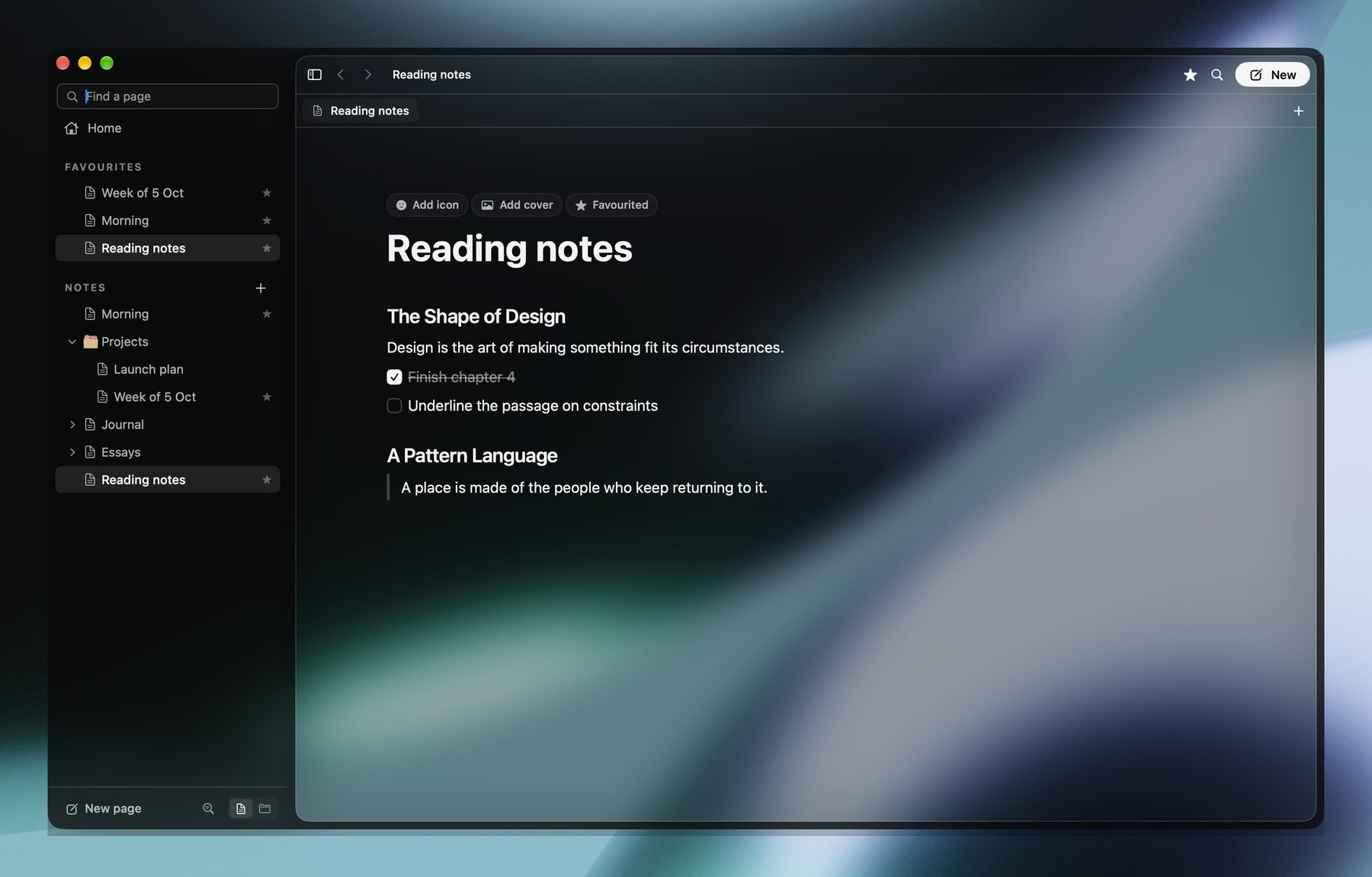
The Reading notes page open in Verse.
~/Verse/Reading notes.md
---
favorite: true
tags: [books]
---
# Reading notes
## The Shape of Design
Design is the art of making something fit its circumstances.
- [x] Finish chapter 4
- [ ] Underline the passage on constraints
## A Pattern Language
> A place is made of the people who keep returning to it.
The same file opens inFinderTextEditVS CodeiA WriterObsidianClaude Codegit
Connect Files today MCP planned

One place every AI can write.

Because every page is a file, an AI edits Verse with the tools it already has, while the app is open, and you watch each change land on the page. Claude Code works today. Connections for Claude, ChatGPT and other assistants over MCP, and a bridge to tools like Notion, are on the way.
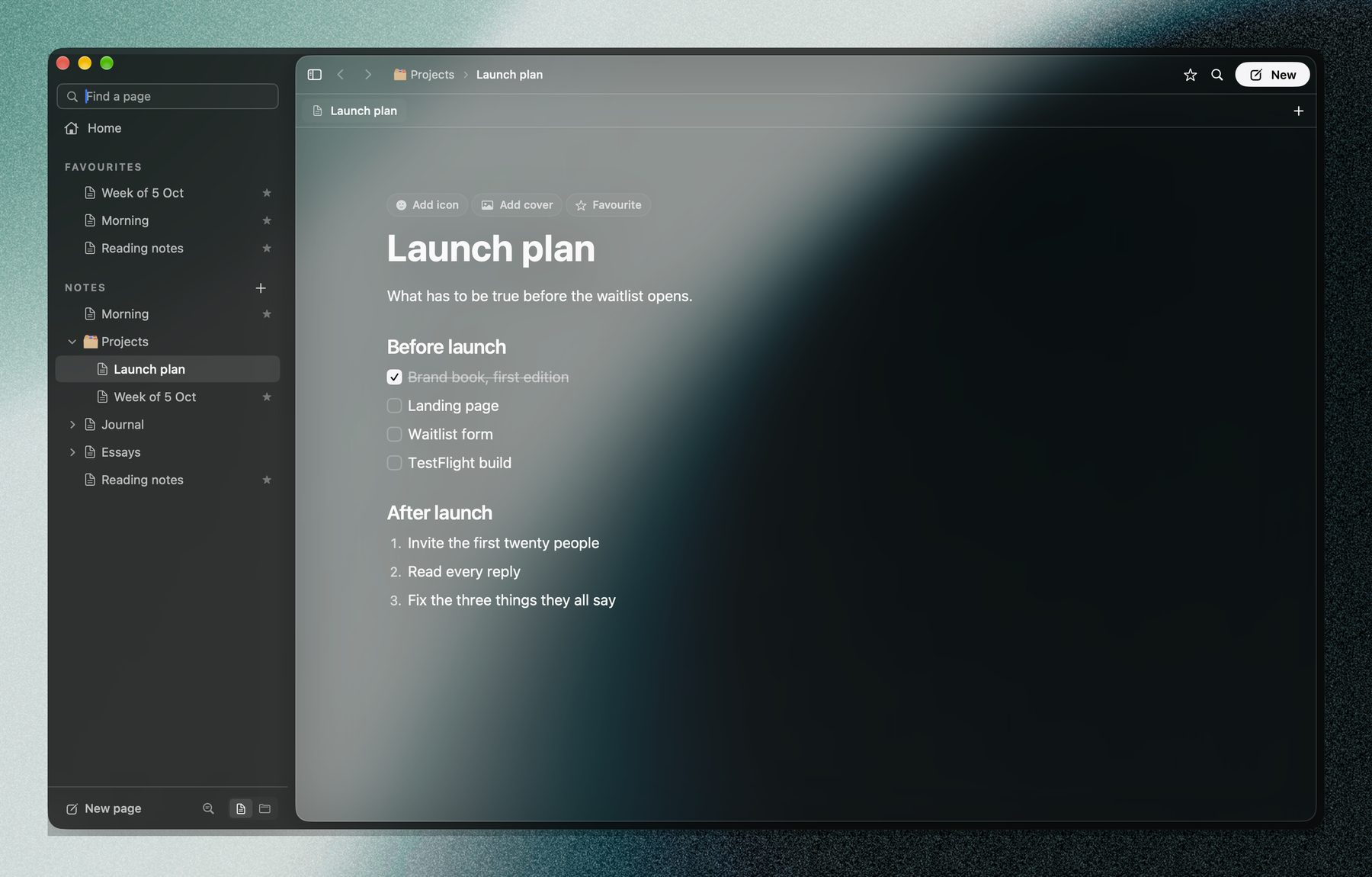
The Launch plan page open in Verse, a checklist of what has to happen before launch.
Over MCP, Verse offerssearchread_pageappend_blockedit_blockcapturelist_today
iPhone

The same folder, in your pocket.

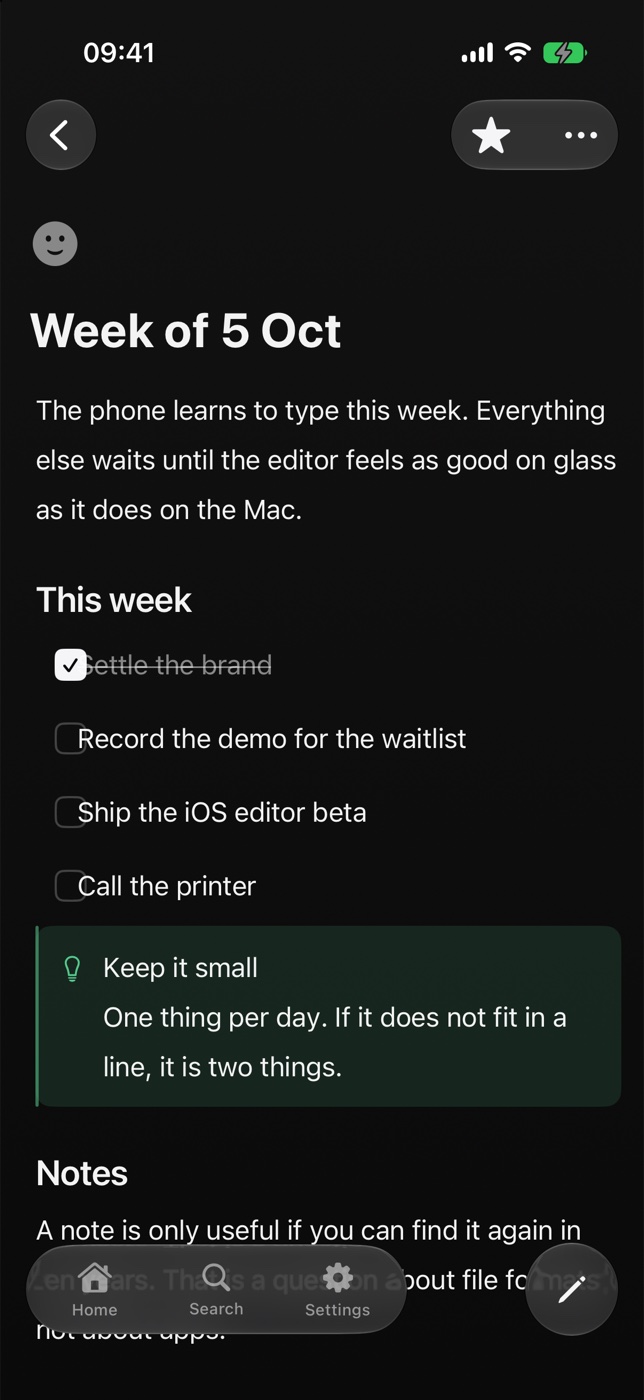
The iPhone app opens the same folder in your iCloud Drive, so the page you wrote on the Mac is already there. Read it, tick a box, jot a line. No sync service, no account.
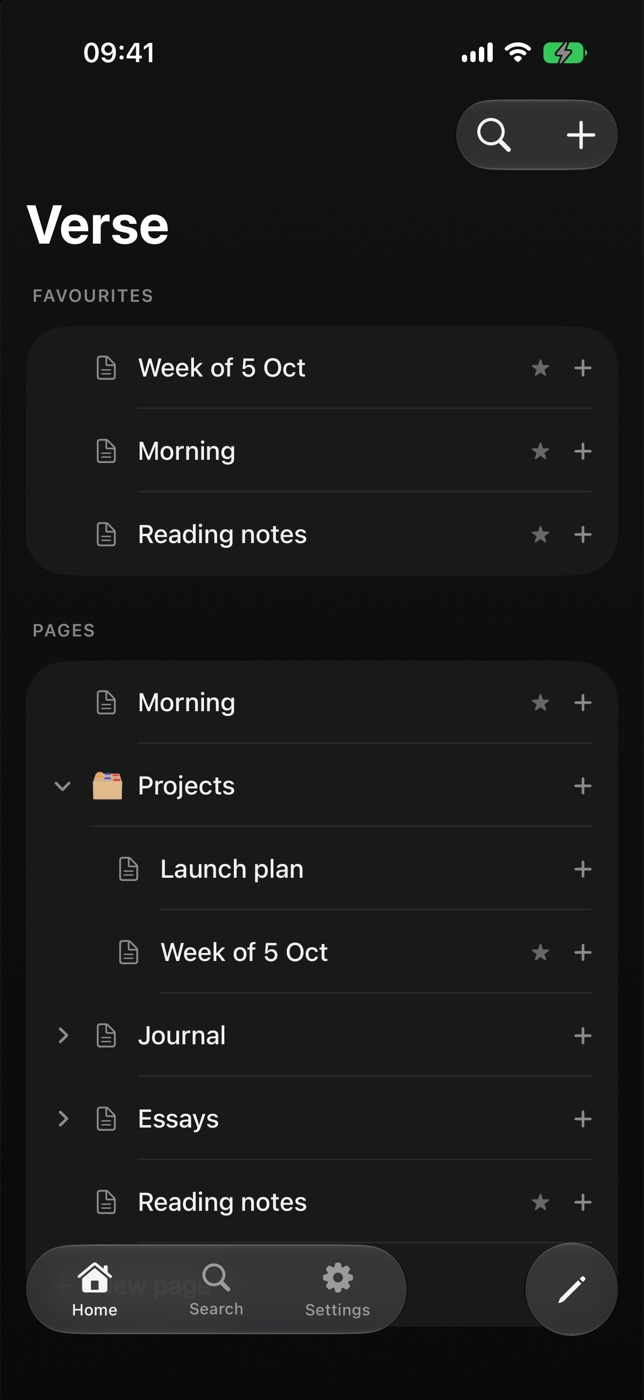
The Verse home screen on iPhone: favourites and the page tree.
The Week of 5 Oct page on iPhone.
The Morning page on iPhone, its grid read top to bottom.
Screenshots from the iPhone simulator, iOS 27
Native, not a web viewSwiftUI and AppKit on every device. Opens instantly, scrolls like the system.
Widgets and controlsCapture, Today, Favourites and any page, on the home screen, lock screen and Control Centre.
Shortcuts and SiriEvery action is an App Intent: capture, open a page, tick a box, all hands-free.
Works offlineYour folder is on the device. A plane is just a quiet place to write.
Where it fits

Not a Notion replacement. A different job.

Notion is a great place for a team to work in the cloud. Verse is the place your notes and your AI live on your own device. Use it beside Notion or Obsidian, and let Verse be where AI writes and you stay in control.

VerseNotionObsidianOpen sourceAppFlowy, AFFiNE, Logseq
Your notes are plain filesMarkdown in your folderIn Notion's cloudExport to get them outMarkdown in your vaultDepends on the toolSome use their own database or format
Block editorBlocks, slash menu, toggles, databasesThe best in classText editor with pluginsBlocks, rougher edges
Layout you can arrangeMagnetic grid, saved in the fileColumnsLinear pagesCanvas is a separate file typeVaries
Native Mac, iPhone, iPadSwiftUI and AppKitWeb app in a shellElectron and a web viewElectron, Flutter or web
Nothing leaves your deviceLocal folder, no accountCloud firstLocal vaultSelf-host or their cloud
Claude edits it directlySame files, live, marked as Claude'sThrough Notion's API and its own AIFiles yes, live view through pluginsThrough each tool's API
SyncYour iCloud Drive, nothing elseNotion's serversPaid Sync, or set it up yourselfSelf-host or their cloud
Works offlineAlways, it's a folderPartlyAlwaysMostly
If the app disappearsYou still have every fileYou have an exportYou still have every fileYou have the code
YesPartlyNoAs of October 2026, from each product's public documentation.
vs NotionSame editor feel. Your notes never leave your folder.No workspace to export from, no account to lose, no page that only loads online. And it's a real Mac app.
vs ObsidianSame promise about files. A far better editor.Blocks, databases and a layout grid out of the box, in native apps instead of Electron. Your vault opens in Verse as it is.
vs open sourceThe file format is the open part.Verse's format is a published spec of plain Markdown, so nothing depends on our code surviving. The app is free to be fast, native and polished.

Your AI’s favourite
notetaking app.

Local notes, an AI lane you can supervise, one button to send any page. Request access and we'll send one email when your copy is ready.

Request access by email

One email when your copy is ready. Nothing else.

What works today and what is planned?

Working today on the Mac: the block editor, the grid, plain-file storage, iCloud folder sync, no account, and an AI that edits files directly. Planned and marked as such on this page: Send to AI, supervised edits with checkpoints and review, fences, an MCP connection and self-hosting. iPhone and iPad follow the Mac.

Do I need an account?

No. Verse opens a folder. Sync is your iCloud Drive. Your email is only used to tell you when it's your turn.

Can I bring my Obsidian vault or Notion export?

An Obsidian vault is already a folder of Markdown, so Verse opens it as it is. A Notion Markdown export opens the same way.

Do my notes leave my device?

Not unless you choose. Verse opens a folder on your machine with no account and no server. Sync is your own iCloud Drive if you want it. Nothing is sent to an AI until you press Send or connect one.

Can I self-host it?

That is the plan. Your notes are already a plain folder you can keep on your own server or git remote, and the AI connection is a small service you would run yourself, so there is no Verse cloud in the middle.

Can AI delete or overwrite my notes?

The supervision lane is built to prevent that: a checkpoint before every AI session, review of every change, fences on pages you protect and limits on large changes. It is on the roadmap, and until it ships, work with an AI on a copy of your folder.

Which AIs does Send to AI work with?

The goal is any of them. Send hands over clean Markdown, so Claude, ChatGPT, Gemini, Claude Code and anything that accepts text can use it. Direct connections come over MCP.

What does Claude need to edit my notes?

Claude Code works with the files directly. For Claude on the web, desktop or phone, Verse offers an MCP connection. Nothing reaches Claude unless you connect it.

What does it cost?

Pricing comes with the public release. People who requested access hear it first.